

Email (EML) analysis &
threat inspection
The mlab Email Scan provides a transparent, analyst-oriented inspection
of raw email files (.eml) to help understand phishing attempts,
spoofing techniques and mail delivery behavior.
This feature requires a free account, but does not consume paid credits.
1. What is an EML file
An EML file is the raw representation of an email message. It contains full SMTP headers, authentication results, routing information and the original message body.
EML files are the primary forensic artifact when investigating phishing, business email compromise (BEC) or identity spoofing.
Forensic artifact
Full SMTP headers, authentication results, routing paths and original message body in a single file.
2. Raw headers inspection
mlab preserves raw headers exactly as received, without modification. This ensures forensic integrity and allows external verification.
- All
Received:hops - Authentication-Results
- Mailer and transport metadata
- Original sender infrastructure
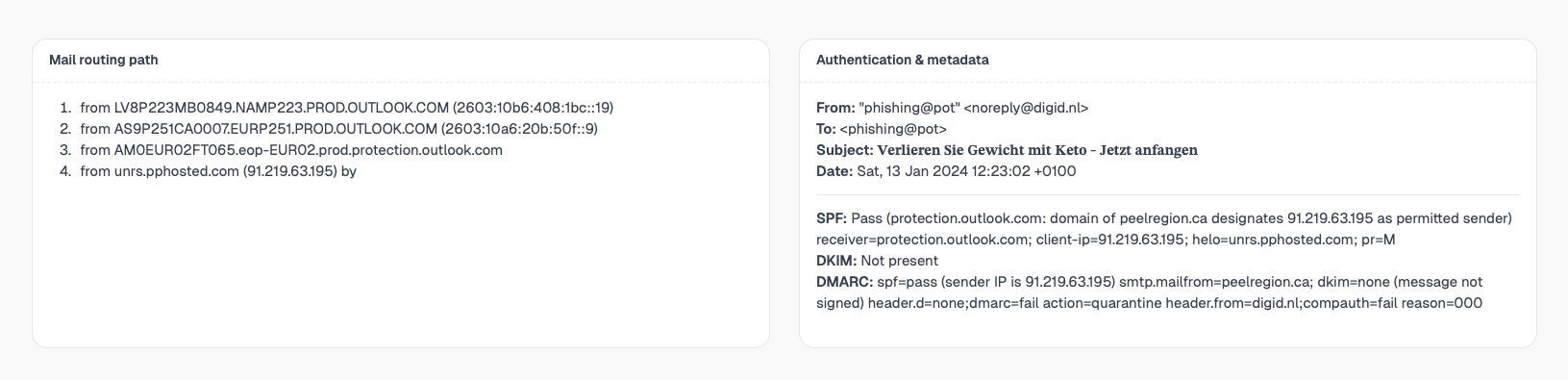
3. Mail routing path reconstruction
Emails often transit multiple relays before delivery. mlab reconstructs a readable routing path to show where the email originated and how it reached the recipient.
Mail delivery timeline
From origin to inbox, every hop is reconstructed and displayed.
Sender
Origin host
Relays
Intermediate hops
Inbound gateway
Filtering stage
Mailbox
Final delivery
4. Authentication & identity metadata
This section summarizes the claimed identity of the email: sender, recipient, subject and envelope information.
- From / To / Subject
- Date and timezone
- Envelope sender vs header sender
5. Email authentication analysis
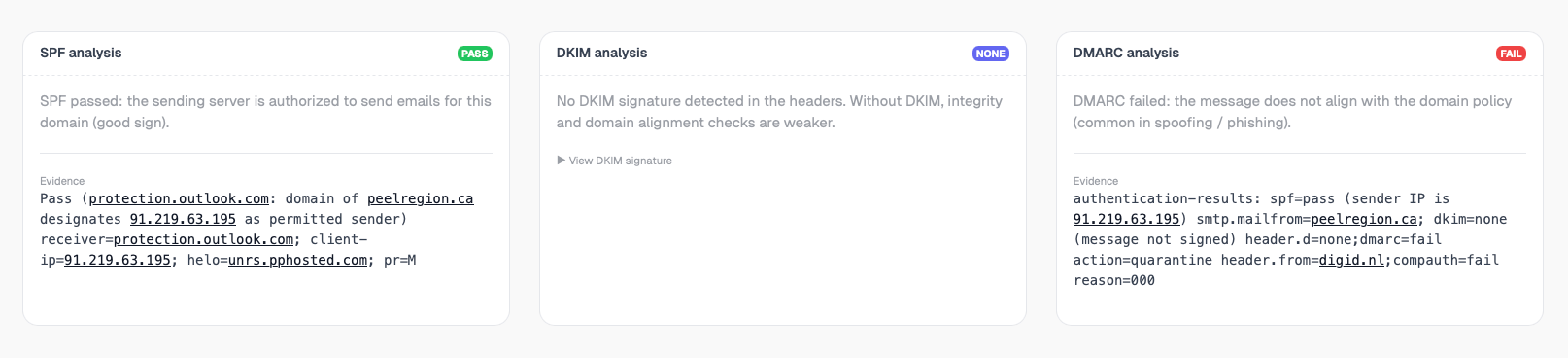
SPF
Verifies whether the sending IP is authorized to send emails for the claimed domain.
DKIM
Ensures the message was not modified and validates cryptographic signatures.
DMARC
Explains policy alignment and why an email was accepted or rejected.
6. Extracted URLs & indicators
All URLs found in the email body are extracted, normalized and displayed in a structured table. Domains and IPs are directly clickable for further investigation.

7. Email body preview (safe)
The email body is rendered as plain text only. No scripts, tracking pixels or remote resources are executed.
Safe rendering
Plain text only. No scripts, no tracking pixels, no remote resources.
8. Access & usage
Account required, Free feature
Email (EML) analysis requires a free mlab account, but does not consume paid credits. This helps prevent abuse while keeping the feature accessible.
Design philosophy
mlab is first and foremost a developer-oriented tool designed for fast file analysis, built with a hands-on, field-driven mindset.
It is developed by SOC analysts, for analysts, developers, security teams, and more broadly anyone who needs to understand what a file or an email is actually doing.
There are no magic verdicts or opaque scores here: mlab exposes raw data, explains the underlying mechanisms (headers, authentication, routing paths, indicators), and lets you make your own call.
The goal is simple: move fast, stay readable, and deliver immediately actionable analysis, whether for quick triage, SOC investigations, technical debugging, or skill building.